

Key Takeaways
- Work from one shared record. Suppliers and clients update documents and approvals inside one platform, not across chat, email, spreadsheets, and drives.
- Three update types exist. A new document, a revision, and a status update each follow a different path and should never be handled the same way.
- Set up before the first upload. Supplier onboarding, role-limited access and approval hierarchies come first; submissions and decisions follow.
- Approved means locked. A change creates a new revision that goes back through approval. It is never an in-place edit.
- Money documents need matching. Invoices are checked against the order, and where relevant, the goods received, before payment is approved.
- Match chains to risk. Use parallel review for technical items and sequential sign-off for money, with value limits, due dates, delegation and escalation.
- Every phase has its own paperwork. From survey to handover and retention release, each stage lives on the same record.
- The audit trail is the evidence. A time-stamped log of who approved what, on which version, settles disputes and supports delay claims.
Suppliers and clients update documentation and approvals in a construction platform by working from one shared project record instead of scattering the work across WhatsApp, email, Excel and drive folders. A supplier uploads a new or revised document, such as a drawing, a proposal, or an invoice, against a specific project item. The platform notifies the right approver, who reviews it, comments, and then approves, rejects, or amends it through a preset approval chain. Every action is time-stamped. Once a version is approved, it is locked and becomes the only one cleared for use, and any later change is submitted as a fresh revision and re-approved. Everyone always builds from the current, authorised version.
That one shift, from updating files to updating a record, is what separates a construction platform from a folder of attachments. It is also where most of the value sits. An approval that is slow or lost is not a paperwork problem; it is a schedule and a cash flow problem. The sections below explain, from both the supplier and the client side, how each kind of update moves through the system, how approval chains should be shaped to the risk involved, and how the audit trail turns decisions into defensible evidence.
What Counts as a Document, and What Counts as an Approval
Documentation is every record that describes what will be built, bought, done, or paid for. It includes design drawings and specifications, the bill of quantities (BOQ), material submissions, quotations, purchase orders (POs), requests for information (RFIs), progress reports, invoices, snag lists and handover documents.
An approval is a recorded decision by an authorised person that a document, price or piece of work is acceptable. Projects run on design, material, commercial, payment and completion approvals. Little should happen on site until the relevant approval exists.
A construction platform is a shared workspace where documents, decisions and conversations live together. Three features separate it from a shared drive:
- Status: every document carries a visible state, such as under review or approved.
- Permissions: each person sees and does only what their role allows.
- History: every action is logged with who, what, and when.
Three Update Types That Should Never Share a Path
Most confusion on projects comes from treating three different things as one.
- New document: something added for the first time, such as a first drawing issue or a fresh quotation. It needs approval.
- Revision: a change to something already submitted or approved. It creates a new version, supersedes the old one, and needs a new decision.
- Status update: progress, delivery dates, snag closure, or payment status that change the record without changing the document. These usually need verification, not full re-approval.
A progress photo and a revised structural drawing should never travel the same route. Keeping the three separate is the first design decision a good workflow makes.
Why WhatsApp, Email and Spreadsheets Lose Control of Approvals
Every construction project is a long conversation between people who rarely share a room. When that conversation lives in chat groups and inboxes, it leaks, and the cost is measurable.
The 2018 Construction Disconnected study by PlanGrid and FMI Corporation, based on nearly 600 construction leaders, found that project team members spend about 35% of their time, over 14 hours a week, on non-productive work such as hunting for information, resolving conflict, and dealing with mistakes and rework. The same research attributed 48% of rework on United States job sites to poor communication and bad project data.
The pattern has not gone away. PlanRadar’s Construction Survey Report 2026, covering 1,728 professionals across 14 countries, found that most project documentation still lives outside a single system, that two in three respondents see more than 10% of their projects run over budget, and that two in three name mid-project changes as a common cause of those overruns.
At a global scale, Autodesk and FMI estimated in their 2021 study that bad data, meaning data that is inaccurate, incomplete, inaccessible, inconsistent, or untimely, may have cost the construction industry $1.85 trillion in 2020, with poor decisions on bad data alone accounting for around $88.69 billion of rework. For context closer to home, India’s Ministry of Statistics and Programme Implementation (MoSPI) reported in its July 2026 flash report that 1,775 central-sector projects worth ₹150 crore or more carried a cumulative cost overrun of about ₹3.4 lakh crore. Documentation is not the sole cause of any of these figures, but weak control over information and decisions sits underneath all of them.
Manual Tools vs a Construction Platform, Side by Side
Aspect | Chat, email and spreadsheets | Construction platform |
Latest version | Unclear, depends on who you ask | One current version, others superseded |
Approval status | Chased by calls and messages | Visible on every item |
Who approved what | Reconstructed from threads | Logged automatically |
Supplier access | Files forwarded individually | Role-limited login to assigned items |
Money control | Invoices checked by hand | Matched against orders and receipts |
Disputes | Argued from memory | Settled from dated records |
The practical gains are speed (approvals stop waiting for someone to notice a message), fewer errors (crews build from the current approved version only), cost control (quantity, rate and invoice discrepancies surface before payment), accountability (every item has an owner, a due date and a history) and defensibility (records stand up in a dispute or an audit).
Who Updates What: Suppliers, Clients and the Middle Tier
Suppliers, meaning vendors, subcontractors, and consultants, generate information. Clients, meaning owners, developers and brand teams, judge it. Consultants or project management firms often sit between the two.
Suppliers typically update:
- Design revisions, with answers to review comments
- Material submissions, with samples, datasheets and certificates
- Quotations and proposals, with rates and quantities
- Order acceptance and delivery dates
- Progress, manpower and blockers
- Invoices raised against orders
- Snag closure, with photographic evidence
Clients and reviewers typically update:
- Markups, approvals and rejections on drawings
- Decisions on material alternatives
- Edits and approvals on proposals
- Order release through the approval chain
- Verification of progress
- Invoice and payment approvals
- Snag verification and final sign-off
Three principles hold across both sides. Each party sees only what it needs, so a supplier sees its assigned packages, not the full budget. Responsibility attaches to items, not to individuals, so the history survives staff changes. And intermediaries get their own review role rather than having files forwarded to them.

Multi-Tier Approvals: Sub-Vendor to Client, Without Relays
On many projects, the client never deals with the lowest-tier supplier. A main contractor approves a subcontractor’s submission, then passes it upward for client approval. Give each tier its own step:
Sub-vendor submits, then the contractor reviews, then the client approves, and the decision flows back down automatically.
Only contractor-approved items should reach the client, and the client’s decision should reach the sub-vendor without anyone relaying it by phone. Role-based supplier and client logins are what make this possible without forwarding files between tiers.
Documents and Approvals at Every Project Phase
Documentation needs change as a project moves. Knowing what belongs to each phase keeps the record complete.
Phase | Typical documents | Typical approvals |
Survey and pre-construction | Site survey, measurements, permits, initial scope | Scope approval, authority permissions |
Design | Concept, layouts, construction drawings, specifications | Design approval, design freeze |
Procurement | BOQ, quotations, rate contracts, purchase orders | Proposal and order approval |
Execution | RFIs, material submissions, progress reports, goods received notes, change orders | Material, change and progress verification |
Billing | Invoices, payment requests | Invoice and payment approval |
Handover and closeout | Snag lists, as-built drawings, manuals, warranties, completion certificates | Snag closure, completion, retention release |
Defect liability period | Defect reports, rectification evidence | Rectification verification |
Get Supplier Documents on File Before the First Order
Suppliers submit more than drawings. Before any order is released, their own documents need to be on record and kept current.
- Identity and tax records: company registration, tax registrations and bank details.
- Licences and certificates: trade licences, insurance cover and safety certifications.
- Labour compliance: statutory registrations such as Provident Fund (PF) and Employees’ State Insurance (ESI) where applicable.
- Commercial terms: rate contracts with validity dates, price lists and item catalogues.
- Performance record: ratings, feedback and an active, inactive or blacklisted status.
Track expiry dates with reminders. An expired insurance certificate or a lapsed rate contract is far cheaper to catch before an order is released than after. Let suppliers upload their own renewed documents through their login, with an internal reviewer verifying them, so the vendor file stays current without anyone chasing it.
Configure the Platform Before the First Upload
Most approval problems are baked in on day one. Four decisions prevent them.
Invite suppliers and clients with role-limited access: Each external party gets its own login, limited to its packages, orders, and drawings. Check on day one that the right items appear. A gap found in week six costs far more than one found at the start.
Configure approval hierarchies: Define who approves each document type, under what conditions and in what order. The usual triggers are order value, rate deviation, and document category. Setting these once removes ad hoc exceptions later.
Define document states: ISO 19650, the international standard for managing information over the life of built assets, organises documents into Work in Progress, Shared, Published and Archived, with a deliberate decision to move between them. Any project can borrow the idea with a simpler set:
- Draft: being prepared by the author. The site cannot build from it.
- Under review: visible for comment. Site cannot build from it.
- Approved: signed off and current. The only state the site can build from.
- Superseded: replaced by a newer revision, kept read-only for history.
Agree on a naming convention and link items. Use one pattern: project code, discipline, item, revision, date. For example, STORE12-FLR-TileLayout-R03-2026-10-10. Add a one-line change note to every revision, and tie each file to a BOQ line, an order, a drawing section, or a snag, so every reviewer opens it with context.
The Eight-Step Approval Flow, Start to Finish
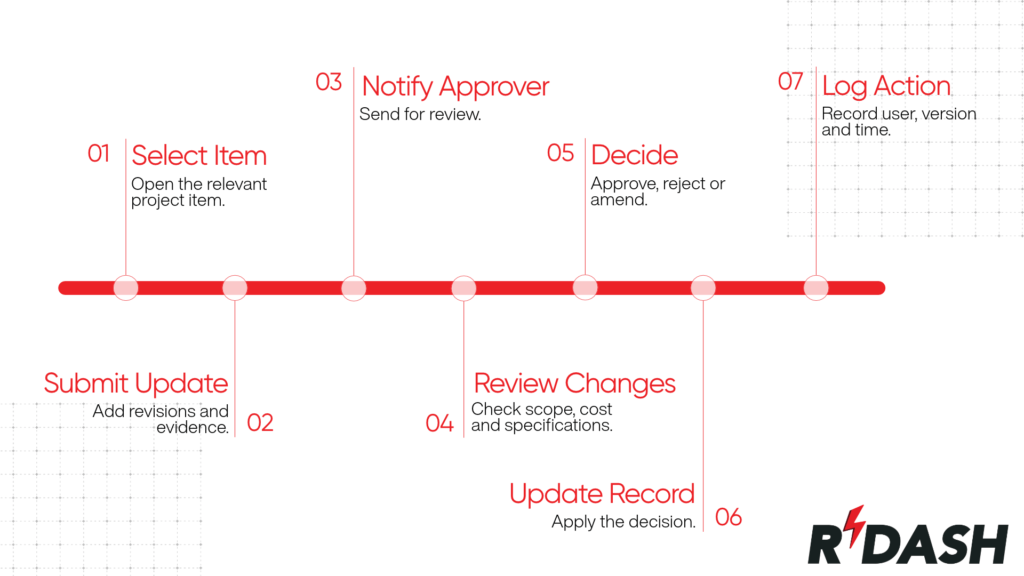
Whatever the document, the flow is the same eight steps.
- Open the relevant project item: The update is made against a specific drawing, order, BOQ line, or snag.
- Upload or enter the update: Include the file, the revision number, a description of what changed, and any supporting evidence.
- The status becomes under review: The previous approved version stays current until a decision is made.
- The approver is notified: The alert links straight to the item.
- The reviewer examines it: They compare it with the previous version, pin comments, and check scope, price, and specification.
- The reviewer decides: Approve, reject with a reason, or amend and approve. Multi-level chains move to the next approver.
- The record updates automatically: An approved version becomes current. A rejected one returns with feedback.
- The action is logged: The audit trail captures who did what, on which version, and when.
A worked example. A client wants a new flooring finish in a retail fit-out. The client issues layout R02. The flooring vendor submits a proposal with a datasheet and a rate. The designer, site engineer, and project manager review in parallel. The designer pins a comment, the vendor replies and uploads a revised datasheet, and the approver trims the quantity before approving. The order is released to the vendor, and the invoice is later matched against that order before payment. Nobody searched an inbox, and nobody had to ask which version was current.
How Each Document Type Moves Through Approval
Design drawings: The design team uploads files into a section of the design area, named and tagged consistently. Reviewers pin comments to specific points and approve or reject. A revision is uploaded as a new version that stays in draft until it enters review. Once every file is approved, many teams freeze the design, so further edits must go through the change process. Version-controlled design management keeps every revision and its decision history in one place.
Material submissions and samples: The supplier packages the specification, test certificates, sample photographs, and delivery timeline into one submission. Technical reviewers check conformity while the commercial reviewer checks price. Parallel review works best here, because the two checks do not depend on each other.
Quotations and proposals: A proposal is a priced set of items awaiting a decision. The client can approve, reject, or edit before approving by cancelling lines, changing quantities or rates, or splitting quantities between vendors. Both the original and the final figures should be preserved.
Purchase orders: Approving a proposal releases an order with payment terms attached. The supplier confirms acceptance and delivery dates. Any later change to quantity or rate re-enters the approval chain.
Requests for information (RFIs): An RFI is a formal question raised when a drawing or specification is unclear or conflicting. Each should carry a number, a date, a due date, and a link to the affected drawing or item. The designer or client responds on the platform. If the answer changes the design, it triggers a revision or a change order, so the RFI and its outcome stay connected.
Permits and authority approvals: Building-plan approvals, fire-safety clearances, utility connections and local permissions vary by city and project type. Record each one with its status, validity, and reference number, and track expiry in the same system so a lapsed permission does not surprise the site.
Progress and daily reports: These are status updates. Site teams or suppliers record progress against BOQ items, along with manpower, photographs, blockers, and the next day’s plan, and a reviewer verifies them. Because progress often triggers payment, reports should reference the same items the orders cover. Daily progress reporting from the field keeps the record current with what is actually built.
Snags: Snags are assigned to a team or supplier with a committed closure date. The supplier closes each one with photographic evidence, and the client verifies it.
Invoices: Match Before You Pay
Invoices are the most controlled documents on the record, because they release money. Good platforms match before they approve.
- Two-way match compares the invoice with the order on quantity, rate, and amount.
- Three-way match adds a check against the goods or work actually received.
For example, a supplier bills for 50 units but only 30 were received. A three-way match flags the mismatch before payment, not after.
Common invoice types:
- Advance: payment before delivery, usually matched only against the order.
- Running account (RA): progressive billing on long contracts, with a defined billing period.
- Final: the closing bill for goods or services.
A credit note reduces the payable amount without altering the original invoice. Deductions cover penalties, descoping, and retention, and the net payable should be calculated by the system, not typed in by hand.
Editing rules that protect the record:
- Changes to quantity, rate, amount, or line items should reset the approval, because the figures being approved have changed.
- Edits to supporting documents or remarks need not reset it.
- Once approved, billing fields should be locked. A correction then means cancelling and rebooking, not quietly overwriting an approved figure.
How Clients Review and Decide Faster
Approval is a sequence of judgements: is the design right, are the quantities fair, is the price within budget, does it match the contract?
- Review with context. Show the new revision beside the previous one and pin comments to exact points.
- Choose one of three outcomes. Approve, reject with mandatory feedback, or request changes under the same reference.
- Give a reason for every rejection. A clear reason shortens the next cycle; “not approved” only forces the supplier to guess.
- Amend before approving when money is involved. Trimming a quantity and approving is faster than a full reject-and-resubmit loop.
- Keep email shortcuts inside the record. Approving from an email link is convenient, but the action must still land in the platform.
Revisions and Change Orders Without Losing Control
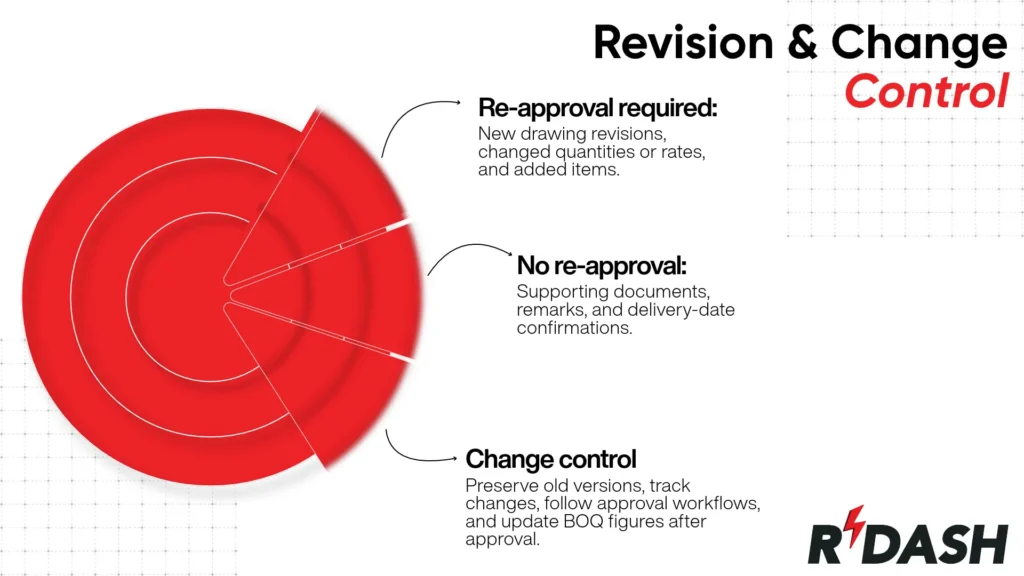
Clients rethink layouts, suppliers propose alternatives, and site conditions force changes. Change is normal, and it is costly when uncontrolled. Analysis of completed building projects by AIA Contract Documents and a long line of academic studies put the typical cost of change orders at roughly 5% to 10% of contract value, and PlanRadar’s 2026 survey found two in three professionals naming mid-project changes as a common driver of overruns. The timing matters as much as the number: the later a change lands, the fewer options an owner has and the more it tends to cost.
These changes need re-approval:
- A new drawing revision
- A changed quantity or rate on a confirmed item
- A new item added to scope
These usually do not:
- A supporting document or a remark added
- A delivery-date confirmation, which is verification only
Rules that keep change controlled:
- Never edit approved files in place. Upload a new version. The earlier one is superseded, not deleted.
- Keep version and action history visible, so anyone can see what changed, when and why.
- Run every change order through the same chain. It should name the affected items, show original and revised figures, state the cost and time impact, and go to the same approvers.
- Let approved changes update the scope, so BOQ figures never drift away from approved decisions.
Build Approval Chains That Don’t Stall
Most delays come from waiting, not from bad decisions. A document sits in a queue because nothing gives the approver a reason to act. Shape the chain to the risk.
- Sequential versus parallel: Sequential review suits financial sign-offs, where authority escalates by value. Parallel review suits technical items, where design, mechanical, electrical, and plumbing (MEP) and cost can all look at once. Routing everything sequentially is the single most common cause of avoidable delay.
- Value-based limits: A small purchase may need one approver; a large order or a rate deviation needs two or three.
- Due dates and ageing: Each pending item should show who holds it and how long it has waited. Where a contract sets review periods, or deems silence as approval, the platform should mirror that.
- Delegation: Approvers nominate substitutes during leave.
- Escalation: Overdue items route to a senior reviewer after a set time.
Document | Approvers | Flow | Suggested window |
Design drawing | Designer, client representative | Parallel, then final sign-off | 3 working days |
Material submission | Site engineer, consultant | Parallel | 3 working days |
Vendor proposal | Project manager, procurement head | Sequential, value-based | 2 working days |
Purchase order | Project manager, finance | Sequential | 2 working days |
Invoice | Site engineer, project manager, accounts | Sequential | 5 working days |
Expense request | Line manager, finance | Sequential, low threshold | 2 working days |
Treat these windows as starting points and adjust them to your contract. Configurable approval hierarchies are what let value limits, due dates and escalation run without manual chasing.
Keep the Conversation on the Record, Not in Chat
An approval system fails if the real conversation happens somewhere else. Comments should be tied to the exact drawing point, order line or snag they concern, so decisions are never reconstructed from message threads. Mentions should notify specific people, and a notification centre should show each person what is waiting on them.
Many supplier updates start on site: photographs, progress, material arrival and snag closure. A mobile app that works from the field removes the lag between work and record, so approvers judge against what is actually built. Daily reports pushed to messaging apps are useful as alerts, as long as the real record stays in the platform.
Closeout, Handover and Retention on One Record
Projects are often won or lost in the final ten per cent, when documentation is thinnest. Keep a closeout checklist on the record from the start:
- As-built drawings showing what was actually constructed, including changes
- Operation and maintenance manuals for installed systems and equipment
- Warranties and guarantees with start dates and coverage
- Test and commissioning reports for services and equipment
- Completion certificates and final joint measurements
- Final invoices reconciled against orders and approved changes
- Retention release, where part of each payment is held until defects are rectified
During the defect liability period, defects are logged, assigned, rectified with evidence and verified, using the same approval path as snags. Retention is released only when the record shows closure.
Audit Trails and E-Signatures That Hold Up
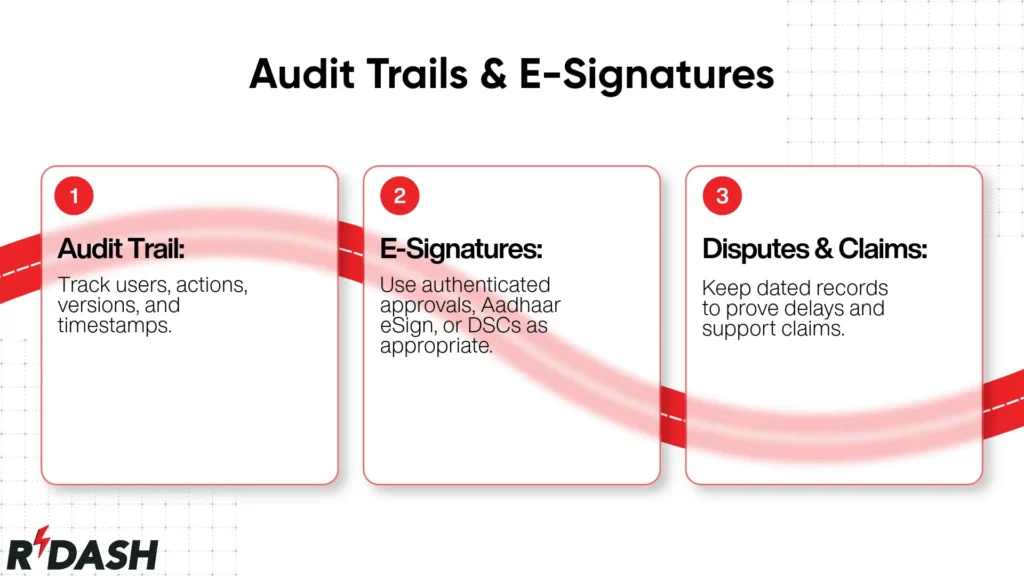
An approval is only as strong as the proof behind it. Disputes are rarely about whether a decision was reasonable. They are about whether it was made, by whom, and on what version.
What a reliable audit trail records: The user, the action (upload, comment, approve, reject, edit), the document version, and the date and time, including any amendments made before approval. A manager can then answer “who approved the revised rate?” in seconds.
E-signatures in India: Under Section 5 of the Information Technology Act, 2000, an electronic signature recognised under the Act carries the same legal standing as a handwritten one where the law requires a signature, and Section 10A confirms that contracts formed electronically are valid and enforceable. Recognised methods include Aadhaar eSign and Digital Signature Certificates (DSCs). A typed name or a click-to-accept carries weaker standing. Match the method to the stakes:
- Routine design or material approvals: authenticated in-platform approval with an audit log.
- Purchase-order release: an in-platform approval chain with value limits.
- Contracts, work orders and completion certificates: Aadhaar eSign or a DSC.
Projects in the United Arab Emirates (UAE) follow local rules, so confirm e-signature requirements locally. This is general information, not legal advice.
Using records in disputes and claims. Many contracts treat delays in client or consultant review as grounds for an extension of time or a cost claim. Dated submission and approval records show when something was submitted, who held it, and for how long. Keep records for the period your contract and applicable law require, which varies, and export the key registers at closeout.
Lock Down Access and Separate Duties
Approvals touch money, design intellectual property, and contractual commitments. Protect them with:
- Role-based permissions set to the minimum necessary access
- Separation of duties, so the person who raises an order is not its only approver
- Read-only approved files
- Revocable supplier access when work ends
- Logs of views and downloads for sensitive files
- Periodic exports of the key registers
Connect Your Tools and Migrate Cleanly
A platform should connect to the tools around it. Look for compatibility with accounting and enterprise resource planning (ERP) systems, so approved invoices and payments flow through without re-entry, and for notifications by email or messaging, so approvers are alerted where they already work. Check which design file formats it can preview.
Moving existing data needs restraint:
- For live projects, upload the current approved versions and a register of what has been issued, and archive old files read-only.
- Do not bulk-upload every historical email.
- Map your vendor list once, with its compliance documents, rather than rebuilding it for each project.
- Start new projects fully in the platform. It is the cleanest way to establish the habit.
Where Automation and AI Actually Help Approvals
Automation removes the waiting that slows approvals. Useful forms include:
- Automatic routing to the right approver based on value or document type
- Reminders and escalation for overdue items
- Anomaly flags, such as an invoice that does not match its order
- Summaries of what changed between revisions
Treat these as aids, not replacements. The decision, and the accountability for it, stays with a named person, and any automatic action should be logged exactly as a human one would be.
Eight Approval Mistakes, and What to Do Instead
Don’t | Do instead |
Approve requests outside the system, leaving no record | Record approvals promptly, with the approver, date, and any conditions |
Build long approval chains for minor items | Keep routine approvals simple; reserve multi-level sign-off for high-value or high-risk items |
Give vague rejection reasons such as “not approved” | Explain the issue and specify the change required, marked up on the document |
Edit approved files directly | Issue a new revision and clearly flag the latest approved version |
Give everyone full access | Apply role-based access and restrict pricing, contracts and confidential files |
Ignore supplier document expiry dates | Track expiry centrally and set reminders before documents lapse |
Skip supplier onboarding | Train suppliers briefly before go-live on how to submit, respond, and track status |
Leave workflows unreviewed | Review workflows monthly, remove bottlenecks and cut unnecessary steps |
Roll Out, Win Supplier Buy-In, and Measure Results
With roles, states and chains configured, a phased launch beats a big-bang switch:
- Pilot on one live project with engaged parties.
- Train briefly, including how to approve from a phone.
- Announce that approvals made outside the platform are not recognised.
- Review after thirty days and adjust.
Bringing small suppliers along. Smaller vendors often have limited technical comfort, patchy connectivity, and little time. Give them a short hands-on session in their working language, a mobile-friendly way to submit, one named contact for questions, and a simple first task such as submitting a single proposal. Make clear that the platform replaces repeated chasing rather than adding to it.
What to measure.
- Average approval turnaround, which shows whether reviewers act on time
- Items overdue, which shows where escalation needs tightening
- Rejection rate and reasons, which shows whether submissions are incomplete or briefs unclear
- Revisions per drawing, which shows whether coordination happens early enough
- Orders without an approval record, which shows whether people are bypassing the system
- Open change orders and their value, which shows whether change is controlled
A dashboard of pending approvals by person and age is the single most useful view. Reuse the same templates and chains across projects, so teams and suppliers learn one way of working.
How to Choose the Right Construction Platform
Use this as a buying checklist:
- Version control with visible history, so nobody builds from superseded files
- Configurable approval hierarchies that match value, type and risk
- Role-limited supplier and client logins, with no file forwarding
- A link between BOQ, orders and invoices, so documents stay tied to money
- Matching and validation on invoices, catching discrepancies before payment
- Mobile access from site, keeping the record current
- An audit trail and e-signature support for dispute-ready evidence
- Integrations with accounting and ERP, avoiding double entry
- Fast deployment and support, so teams work in weeks, not quarters
- A simple user model that encourages every stakeholder to take part
How RDash Handles Supplier and Client Approvals
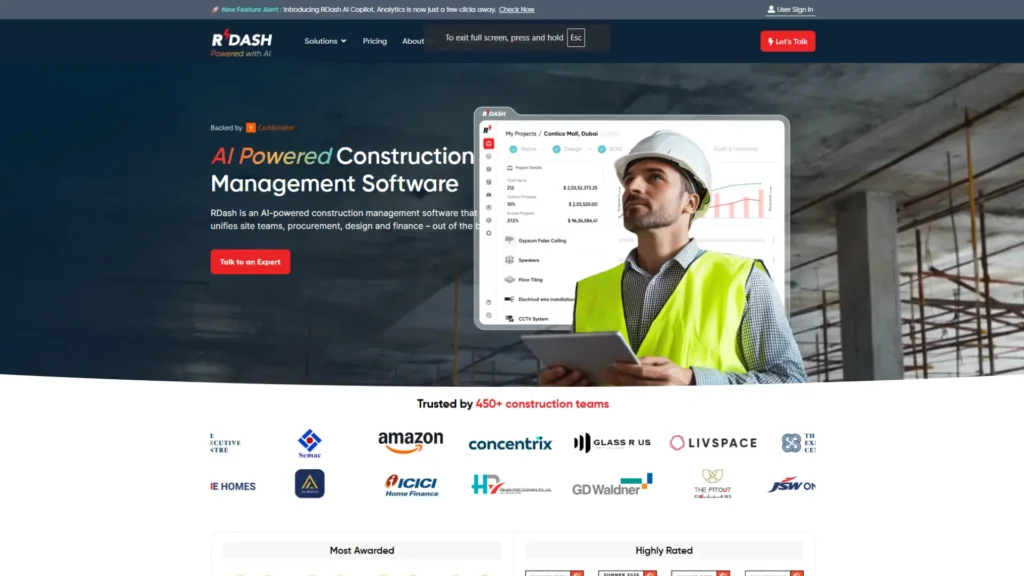
RDash is an AI-powered construction management platform used by interior fit-out firms, contractors, EPC and MEP contractors, PMC consultants and developers across India and the UAE. RDash reports more than 450 construction teams on the platform, with clients including Livspace, Amazon, ICICI Home Finance and The Executive Centre. Its unlimited-user model is built so that every stakeholder, from site to finance to vendor, works on one record. The steps described above map directly onto its workflows, and the RDash help centre documents them.
Roles, supplier access and approval rules: Admins create roles with specific permissions and notifications and assign them per project. Teams add vendor users against the vendor’s organisation and store tags, bank details and documents there, and can mark a vendor active, inactive or blacklisted. Approval hierarchies for expenses, invoices, vendor payments and orders are configured with their own conditions and approvers. RDash’s third-party collaborator logins are designed specifically to let suppliers and clients update documentation and provide approvals without files being forwarded.
Design files: upload, version, approve, freeze: Teams upload multiple files into design sections, rename and tag them, and approve or reject from the file or its preview. A new version is uploaded as a draft and keeps its version and action history; approved files can be reopened if needed, and once all files are approved, the design can be marked frozen, with every status change recorded.
Vendor proposals and orders: In the order flow, an approver can edit a vendor proposal by cancelling elements, adjusting quantities, changing rates, or breaking down quantities before selecting payment terms and releasing the order. Teams can also raise orders directly, attach a purchase order and remarks, and send by email or save as a draft.
Client proposals and revised quantities: From the BOQ and change-orders flow, a team moves selected elements into a proposal and sends it to the client, who can approve, revie,w or reject. If quantities or rates on already confirmed elements are revised, the edited proposal returns to the client for approval, and approved changes then reflect in the BOQ.
Invoices and payments: Invoices are booked against an order, as advance, running account or final invoices, and checked against the order and, where goods are involved, against the goods received note for a three-way view. Approval hierarchies and country-specific tax rules apply, and credit notes, deductions and payment requests are supported through the procurement and finance workflow.
Progress, comments and notifications: Site teams update progress against BOQ items and generate a daily progress report with photographs, worker categories, blockers and the next day’s plan. A notification centre surfaces what is waiting on each person, and comments on design, survey and order items keep approval conversations in context.
These are not abstract claims. In RDash’s published case study, Om Sai Intex, a ₹643 crore interior fit-out firm, reported roughly 70% faster approval turnaround, every purchase order traced back to its BOQ, and about a 60% drop in manual follow-ups after moving off a split ERP, Excel and WhatsApp stack. In the UAE, Dubai fit-out house Occasion Interiors reported every request traceable from purchase request to local purchase order to goods received note on one platform.
The Bottom Line: If It’s Not on the Record, It Didn’t Happen
Updating documentation and approvals in a construction platform is less about software than about agreement. Suppliers agree to submit complete, versioned work against specific items. Clients agree to review within set times and decide with reasons. Both agree that if it is not in the platform, it did not happen.
When that discipline covers every phase, from supplier onboarding and design through invoices, closeout, and retention, and sits on one record with configured chains and a reliable audit trail, the familiar delays start to disappear. Teams in India and the UAE that want this in a single workspace can see how RDash handles it.
Frequently Asked Questions
How do suppliers update documents in a construction platform?
Suppliers open the relevant project item, upload the file with a revision number and a short change note, and submit it. The status becomes under review, and the approver is notified. Progress, delivery, and invoice updates are entered against the same item.
How do clients approve documents in a construction platform?
Clients open the submission, compare it with the previous version, add comments, and then approve, reject, or amend it. Approval makes that version current and logs the action. A rejection needs a written reason so the supplier knows what to fix.
What is the difference between a submittal, a transmittal, and an approval?
A submittal is the package a supplier sends for review. A transmittal is the record of it being sent, showing what went to whom and when. An approval is the reviewer’s formal decision on it. Platforms usually link all three.
What is document version control in construction?
Version control gives each revision a number, date, and author, keeps earlier versions, and marks only the latest approved one as current. Teams can compare versions, and site crews cannot build from superseded drawings.
What happens when an approved document needs to change?
It is not edited in place. The change is uploaded as a new revision and goes back through approval. The earlier version is marked superseded and archived, so history stays intact, and the audit trail shows what was valid on any date.
What is three-way matching for construction invoices?
Three-way matching checks an invoice against the purchase order and the goods or work actually received before approving payment. It catches billing for items not yet delivered, or at rates or quantities above the order.
Can digital approvals be legally valid in India?
Yes, when done properly. The Information Technology Act, 2000 gives recognised electronic signatures, such as Aadhaar eSign and Digital Signature Certificates, the same standing as handwritten ones. A plain click-to-accept has weaker standing. Check with counsel for specific documents.
What is an RFI in construction and how is it answered?
A request for information is a formal question raised when a drawing or specification is unclear or conflicting. It carries a number, a date, and a due date, and links to the affected item. The designer or client answers on the platform, and any resulting design change becomes a revision or a change order.
What documents are needed at construction handover?
Typically, as-built drawings, operation and maintenance manuals, warranties, test and commissioning reports, completion certificates, final measurements, and reconciled final invoices. Retention is released once defects are rectified and verified. Exact requirements depend on the contract.
How long does it take to move approvals onto a construction platform?
It varies by platform and project size. A practical approach is to pilot on one live project, configure chains and permissions, train suppliers briefly, and review after about a month. RDash offers a 90-day deployment guarantee with dedicated account-management support, and says most teams go live within days.