


Key Takeaways
- Construction management software deployment has three distinct finish lines: go-live in days, full adoption in four to twelve weeks, steady state at roughly ninety days.
- Cloud deployment is the single biggest timeline lever. SaaS platforms skip infrastructure procurement entirely; on-premise systems add weeks before any user logs in.
- Data migration is the largest swing factor. Two firms buying identical software can differ by weeks based on BOQ and vendor data quality alone.
- Undocumented approval hierarchies stall construction deployments more than any other configuration task. Write conditional approval rules down before configuration, not during.
- Deployment failures are organisational, not technical. Industry research consistently attributes ERP overruns to training gaps and unclear ownership rather than software defects.
- A pilot on one live project catches most problems at a fraction of the cost of discovering them across every site simultaneously.
- Scope discipline beats scope ambition. Deploy the module fixing your biggest cost leak first, then layer additional functions in afterwards.
- Mobile-first capture determines whether adoption happens. If site supervisors cannot log data where the work is, dashboards stay empty.
If you’ve just signed off on new construction management software or you’re about to, one question outlasts the price negotiation: how long until this thing is actually running my projects?
It’s the right question, and it rarely gets a straight answer. Vendors say days. Consultants say months. A peer who bought an enterprise ERP two years ago says they’re still not fully live. All three can be telling the truth, because they’re describing different architectures, different companies, and the part that trips everyone up: different definitions of done.
Deployment sits on a spectrum, and where your firm lands on it has far less to do with the logo on the software than with decisions you make before the first user logs in. How you scope the rollout. What condition your BOQs and vendor master are in. Whether one person owns adoption or a committee nominally does.
What follows maps that spectrum end-to-end: the realistic ranges, what each phase costs you in calendar time, the six factors that stretch or compress the schedule, and the specific mistakes that turn a two-week rollout into a two-quarter saga. By the end, you should be able to look at your own firm, your sites, your data, your team, and estimate your timeline with confidence rather than hope.
Why Deployment Timeline Estimates Contradict Each Other
Ask three people how long implementation takes, and you will get three numbers that appear irreconcilable. A vendor says days. A consultant says months. A peer who bought an enterprise system two years ago says they are still not fully live.
All three are usually telling the truth. They are describing different finish lines.
This is the most useful thing to understand before you sign anything, because it converts an unanswerable question into three answerable ones. Once you can specify which milestone you are asking about, you can hold a vendor to a date instead of a reassurance.
The Three Deployment Milestones: Go-Live, Adoption, and Steady State
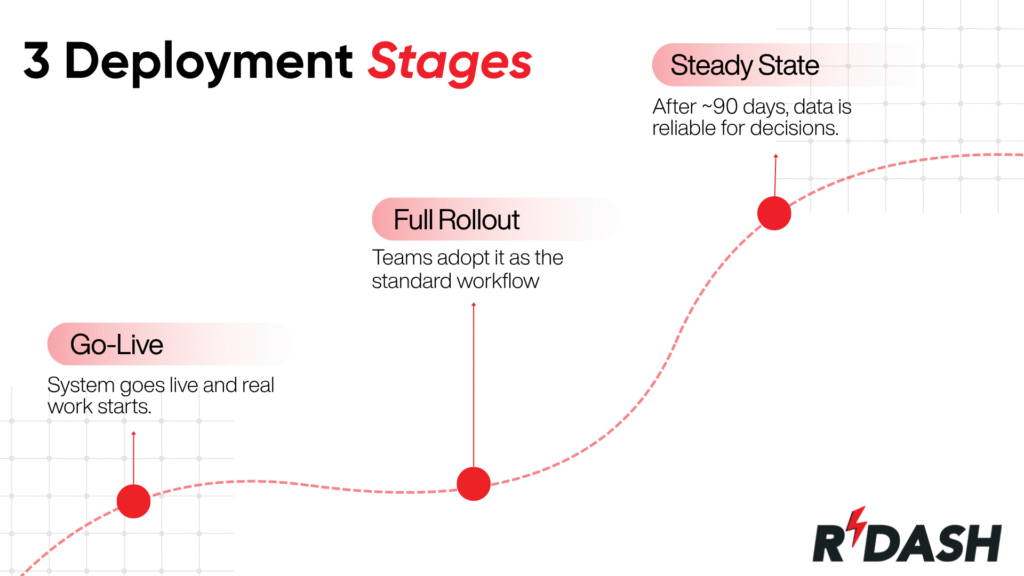
Go-live: first productive use of the system
The system is switched on, and someone does real work in it: creates a project, uploads a bill of quantities, logs a site report. This is the fastest milestone and the one vendors quote, because it is the one they control. It is genuine progress. It is not the same as your company running on the system, and conflating the two is how firms end up six months in wondering why nothing has changed.
Full rollout: when the software becomes the default
The site engineer records progress on their phone without being chased. Every purchase order goes through the system. Finance stops keeping the shadow spreadsheet.
This is the milestone that produces returns, and the one firms consistently underestimate, because it depends on behaviour rather than installation. You cannot buy it, configure it, or schedule it the way you schedule a server build.
Steady state: when the data becomes decision-grade
Everyone is using it, and the work turns to tuning, refining approval routes that turned out wrong, wiring in the accounting integration, letting enough data accumulate that dashboards are worth opening. Roughly ninety days is a reasonable expectation for a well-run cloud deployment to reach the point where reports are trusted for decisions.
The distinction matters commercially. When a vendor promises a timeline, ask which of the three they mean and get it in writing. A guarantee attached to go-live is a materially different commitment from one attached to rollout.
Construction Software Deployment Timelines by Scenario
Deployment scenario | Time to value | What “done” means |
Cloud/SaaS, single team | Days to 2 weeks | First live project running |
Cloud/SaaS, full rollout | 4–12 weeks | Whole org using it by default |
Mid-market, multi-module | 3–9 months | Multiple departments, integrations live |
Legacy ERP, single entity | 4–12 months | Finance and operations live post-configuration |
Multi-entity, on-premise | 12–24 months | Regional rollouts, customisation complete |
The spread between the top and bottom rows is roughly fifty to one, for software performing broadly similar functions. That gap is architecture and preparation, not product quality.
Modern construction platforms are deliberately built to sit at the fast end of this table. RDash, for instance, is designed so that most teams go live within days through structured onboarding, with a 90-day deployment guarantee reserved for full enterprise rollouts, a world away from the “clear your calendar for next year” reputation that legacy systems earned. The rest of this article explains why that gap exists, and how to make sure you land on the right side of it.
The Six Factors That Determine Your Deployment Timeline
Cloud versus on-premise: the largest single lever
A SaaS platform requires no server procurement, no infrastructure build, and no IT project standing between purchase and first login. You configure and go. On-premise or self-hosted systems add weeks to months of infrastructure work before a single user touches the software, and that work happens before anything visible has been achieved, which is politically corrosive inside a company waiting for results.
Scope discipline: deploy the leak, not the wishlist
A deployment covering site reporting and procurement goes live far faster than one attempting scheduling, procurement, finance, document control, and CRM at once. Firms that move fastest identify the process currently leaking money, deploy that, and layer the rest in afterwards. Firms that stall try to solve everything in a single release.
Data quality: the quiet timeline killer
Two firms buying identical software can differ by weeks on this factor alone.
Worth being specific here, because “data migration” sounds like an IT task and is actually a construction task. What has to move is your BOQ structure, vendor master, and rate contracts. The problems are rarely technical. Item descriptions are inconsistent across projects. The same vendor exists three times under slightly different names. Units of measurement vary between sheets. Nobody is certain which BOQ version is authoritative.
None of that is fixed by software. It is fixed by someone sitting with the spreadsheets before migration begins. Firms that do this land at the fast end of every range above. Firms that skip it discover the mess after the deployment goes live, at which point it has been faithfully reproduced inside a system everyone was promised would fix it.
The discipline that saves time is selective migration: move current, active data rather than a decade of history. Clean beats complete. The BOQ you migrate becomes the baseline against which every future cost, variation, and change order is measured, so errors here stay expensive long after the deployment is forgotten.
Approval hierarchy configuration: where construction deployments actually stall
This is where construction diverges from generic software rollouts, and most implementation guides miss it entirely.
Construction approval chains are conditional in ways that are rarely written down. A requisition under a certain value goes to the project manager; above it, the commercial head; above that, a director. Except on client-funded work, which routes differently. Except during monsoon, when site-level authority is raised so material orders are not delayed. Except for the one client whose contract requires their own sign-off on subcontractor appointments.
Every firm has ten of these rules. Almost none has them documented. They live in two or three people’s heads and get discovered one at a time, usually when an approval bounces to the wrong person, and a delivery is held.
Writing them down before configuration begins, rather than during, routinely saves a week and prevents the credibility damage of a rollout where approvals visibly do not work.
Company size and concurrent project load
A single-site contractor and a developer running thirty simultaneous projects across four cities are not on the same schedule regardless of what they buy. More sites mean more configuration, more training cohorts, and a longer path to adoption.
Integrations and customisation depth
Out-of-the-box workflows deploy quickly. Bespoke automation logic and deep two-way accounting integrations add time, though the right integration, wired early, stops finance maintaining a parallel universe and pays for itself well inside the first year. Platforms connecting natively to common accounting and ERP systems avoid the custom-build work that stretches legacy timelines.
Change-management readiness
The least technical factor and reliably the most decisive. A firm with a credible internal champion and site teams already comfortable on mobile adopts in a fraction of the time of one where software arrived from head office without explanation.
The Deployment Timeline, Phase by Phase
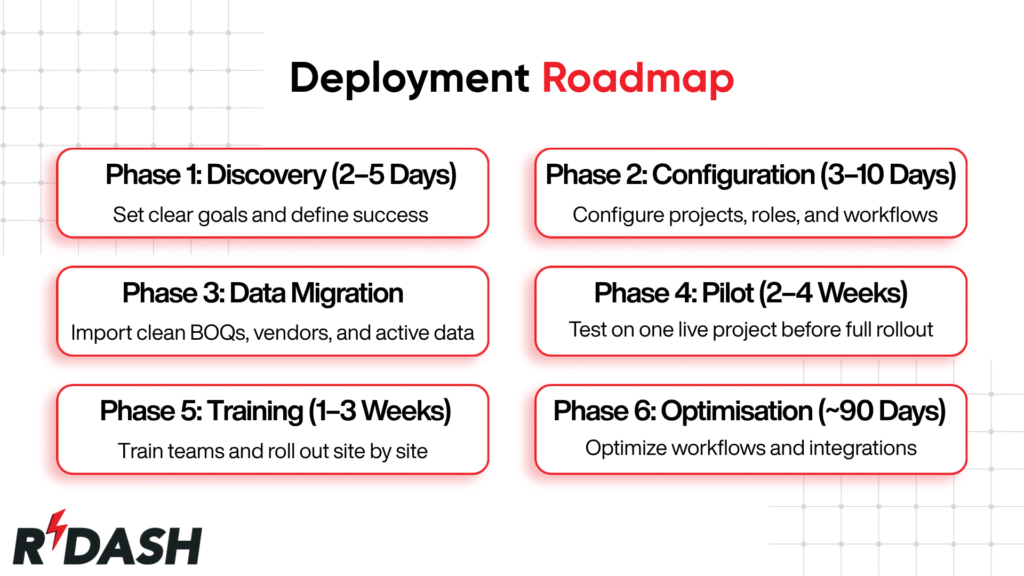
A deployment isn’t a single event; it’s a sequence of phases, some of which overlap. Understanding how long each one realistically takes is what lets you build a schedule you can actually defend to leadership.
Phase 1: Discovery and goal-setting (2–5 days)
Before anyone touches a setting, you decide what problem you’re solving. The most durable deployments start with outcomes the specific leaks you want closed, whether that’s cost overruns discovered too late, approvals that drift for days, or a BOQ nobody trusts. This phase is short but disproportionately important, because a vague objective produces endless configuration revisions later. Name the one or two things that must improve, and write down what “go-live” actually means for your firm.
Phase 2: Configuration and workflow setup (3–10 days)
Now the platform gets configured around how your teams actually work: projects, roles, permissions, and most importantly in construction, your approval hierarchies for purchase requests, vendor orders, and expenses. On a modern SaaS tool with sensible defaults, this takes days, not weeks. The trap is trying to bend the software to replicate every quirk of your old process; configuration should reflect real project scenarios, not a theoretical org chart.
Phase 3: Data migration (days to weeks, the big variable)
This is where timelines live or die. Migrating existing BOQs, vendor lists, and rate contracts is consistently the single largest swing factor in how long a construction deployment takes. If your data is clean and structured, it maps quickly. If it lives in a file called BOQ_final_v3_revised_FINAL.xlsx, duplicated across three other places, expect this phase to expand. The discipline that saves you is selective migration: bring across current, active data rather than a decade of history, because clean data is far more valuable than complete data. Getting the BOQ right at this stage matters beyond the schedule, since the BOQ becomes the baseline every future cost, PO, and change order is measured against.
Phase 4: Pilot on one live site (2–4 weeks)
Resist the urge to switch on everything everywhere. Run the system on a single real project first, with a small group, while normal work continues. A pilot with just a handful of engaged users surfaces roughly 80% of the problems you’d otherwise hit at full scale, with a fraction of the disruption. Just as valuably, it creates your first internal champions: the supervisors who’ve proven the workflow and will vouch for it to everyone else.
Phase 5: Training and rollout (1–3 weeks)
With the pilot validated, you expand site by site rather than all at once, which keeps risk contained and momentum visible. Training should be role-based. A site engineer, a procurement lead, and a finance controller each touch the system differently and need different instructions. And it sticks faster when delivered on your own live projects rather than on demo data.
Phase 6: Optimisation to steady state (~90 days)
Going live isn’t the finish line; delivering measurable results is. Over the first 90 days, you fine-tune workflows, connect your accounting or ERP stack so finance stops duplicating entry, and let usage data accumulate until reports become trustworthy. This is also when return on investment becomes visible against your pre-deployment baseline, which is exactly why capturing that baseline before you start matters so much.
These phases don’t have to run strictly end to end, though. Configuration and data migration often overlap, and a narrow first rollout can begin while later modules are still being configured. That parallelism is precisely how well-run deployments compress a nominal “months” into “weeks.”
Why Construction Software Deployments Slip
The instinct is to blame the software. The evidence points to organisations.
ERP implementations overrun planned schedules more often than they meet them, and the causes reported in industry research are consistently organisational rather than technical: insufficient investment in training, unclear ownership, underestimated change management, rather than software defects. Panorama Consulting’s annual ERP Report and the Standish Group’s project outcome research both document this pattern, and it has held stable across two decades of studies.
Construction has its own version. The sector’s productivity record relative to other industries has been documented at length by the McKinsey Global Institute, whose construction productivity research identifies slow technology adoption and fragmented information flow as structural rather than incidental problems.
On site, the failure mode is almost always identical: the software is fine, and nobody uses it. The barriers recur across firms: cost concern, thin in-house digital skills, entrenched habit, and data too messy to trust. Software overcomes none of these. People do, and only when someone is accountable.
How to Compress Your Deployment Timeline
Clean your data before it moves:
Standardise BOQ templates, deduplicate the vendor master, fix units and naming conventions. Highest-leverage work available, and it happens before day one.
Pilot before you scale:
Skipping the pilot to save two weeks is the most expensive shortcut in the playbook, because problems you would have found cheaply on one project instead appear across all of them simultaneously, in front of everyone.
Roll out site by site:
Each wave learns from the last and disruption stays contained. More than a quarter of organisations in the 2026 ERP Report now use a hybrid approach rather than purely phased or purely big bang, going live with core modules or a pilot entity quickly while sequencing additional locations and functions over time. Panorama frames this as the best compromise for protecting revenue-critical operations, showing early ROI, and controlling risk.
Name a champion, not a committee:
Successful implementations run through one accountable person bridging site and leadership. Committees cannot decide fast enough for a rollout to hold momentum. Deloitte’s guidance is the same: any project transitioning from pilot to full rollout needs a champion, because motivation for change wanes during a long rollout or when unexpected challenges appear at scale.
Write a strategy, even a short one:
Businesses with an organisation-wide digital strategy run 4.3 more technologies on average than those without, and the share of construction firms with any digital strategy rose from 65% to 76% in a single year. A one-page document naming the problem, the owner, and the success metric outperforms an unwritten intention.
Insist on mobile-first:
On site, the entire value depends on supervisors capturing data where work happens. Mobile apps are already the third most adopted technology in construction, used by 41% of firms, and rank among the highest for returns, with 83% of adopters reporting strong business returns or positive ROI. If the mobile app is awkward, nothing else on this list matters: data never arrives, and dashboards stay empty.
Use the vendor’s onboarding:
Firms leaning on vendor account management for template and structure migration reach adoption measurably faster than those going alone. You are paying for it either way.
Measure before and after.
Deloitte’s third priority action is tracking a range of success measures, because new technologies need longer lead times to generate ROI as employees become familiar with them, and failing to capture impact at the pilot stage stifles the case for further investment.
Worked Example: Deployment Timeline for a Mid-Sized Fit-Out Contractor
Several active projects across two cities, currently running on WhatsApp groups, Excel BOQs, and a shared Drive.
Days 1–3: Leadership names an internal champion, usually the project head feeling the pain most acutely, and picks the biggest leak: purchase orders scattered across email with no approval trail. Go-live is defined narrowly as one live project with procurement flowing through the system.
Days 3–7: Configuration and data prep run in parallel. The platform is set up with the firm’s approval hierarchy while procurement and finance clean and export the vendor master and current BOQ. The overlap is where the calendar compresses.
Week 1: Go-live on one project. Site engineers log daily progress from their phones; every new PO is raised in the system.
Weeks 2–4: The pilot runs a full cycle: requisition, order, invoice, site report, approval. Problems surface and are fixed cheaply. Two supervisors become advocates.
Weeks 4–8: Rollout to remaining projects one at a time, with role-based training on live data. The accounting integration goes in, and finance stops double-entering. By the two-month mark, the firm runs on the platform by default.
Through day 90: Workflows tuned, dashboards refined, data mature enough to trust. Gains become measurable against the kickoff baseline.
Three finish lines, sequenced deliberately: productive use in a week, adoption in two months, steady state at ninety days.
How RDash Approaches Construction Software Deployment

RDash is a construction management platform built specifically for construction and fit-out work interiors, real estate, MEP, industrial, and corporate projects designed to replace the WhatsApp, Excel, and Drive stack most teams run on. Because it is cloud-first and purpose-built rather than a general ERP adapted to construction, it sits at the fast end of every range in this article: most teams go live within days through structured onboarding, with guided deployment typically running one to four weeks.
Two design decisions address the timeline risks above directly. RDash treats BOQ and vendor migration as a supported service rather than a customer responsibility, neutralising the largest swing factor in construction deployments. And it is built mobile-first for mid-range Android devices, which is where site data actually gets captured the point at which most rollouts quietly fail.
If you want to see what deployment looks like for a firm your size, including what migrating your existing BOQs and vendor data involves, that conversation is worth having before you commit to a platform. (Internal link: demo request or contact page.)
The Bottom Line
The question is three questions: how long to switch it on, how long until the organisation runs on it, and how long until it produces measurable results. Days, weeks, and about ninety days respectively for a well-run cloud deployment, stretching to many months only when on-premise infrastructure, heavy customisation, or scattered legacy data pull it there.
The calendar is mostly in your hands, not the vendor’s. Panorama’s own conclusion after surveying 170 organisations is that while cloud adoption and AI capabilities continue to enable real-time analytics, success hinges on data readiness and organisational alignment, with clear process ownership and rigorous change management determining project outcomes.
Choose a platform built for your industry, phase your scope, clean your data before it moves, pilot before you scale, and put one accountable person in charge of adoption. Do that, and a project firms have historically dreaded pays back inside a quarter.
The software matters. What you do around it matters more.

Frequently Asked Questions
How long does it take to deploy construction management software?
Days for go-live on a cloud platform, four to twelve weeks for full organisational adoption, and several months to two years for a heavily customised on-premise ERP. Deployment model, data quality, and change management determine where you land far more than software brand does.
What is the difference between go-live and full deployment?
Go-live is first productive use your team does real work in the system. Full deployment means the software has become the default way people work across every role and site. Steady state, around ninety days, is when data is trustworthy enough to base decisions on.
Why do vendors quote days when consultants quote months?
They measure different milestones and sell different architectures. Cloud platforms quote go-live; on-premise ERPs quote fully configured deployment following an infrastructure build. Both can be accurate. Always establish which milestone a quoted timeline refers to.
What takes the longest during construction software implementation?
Data migration and user adoption. Cleaning and mapping legacy BOQs, vendor lists, and rate contracts is the largest schedule variable, and persuading people to change how they work is the most common reason rollouts stall short of full value.
Can deployment be accelerated without cutting corners?
Yes. Clean your data before migrating, pilot on one live site, roll out site by site, name a single accountable owner, choose a mobile-first tool, and use vendor onboarding support. These compress the schedule because they prevent the rework causing overruns.
Does company size change the deployment timeline?
Substantially. A single-site contractor can be productive in days; a developer running dozens of concurrent projects needs more configuration, more training cohorts, and a longer path to adoption on identical software. Phasing keeps larger firms’ schedules under control.
Is a pilot necessary or can we launch to everyone at once?
A pilot is strongly recommended. It catches most problems at a fraction of the disruption and produces the internal advocates driving wider adoption. Big-bang launches concentrate every unresolved issue into a single high-stakes moment, usually with an audience.
How long does RDash take to deploy?
Most teams go live within days, with guided deployment typically running one to four weeks. Because BOQ and vendor migration is handled as a supported service and the platform is mobile-first, it avoids the two factors most often slowing construction deployments.