
Key Takeaways
- AI in construction management software automates reporting, predicts delays, controls costs, detects risk early, and answers plain-language questions about projects.
- The biggest gains come from unified data, not standalone AI features; fragmented tools produce unreliable AI output.
- Conversational AI co-pilots are the breakthrough that makes advanced analytics usable by non-specialists.
- RDash builds AI into a connected design-procurement-finance workspace, with the AI Co-pilot delivering prompt-based analytics, contextual memory, and exportable insights.
- The technology is ahead of adoption; firms that move now gain a measurable edge while competitors are still “exploring.”
How Is AI Used in Construction Management Software?
AI in construction management software analyses project data, schedules, budgets, BOQs, site reports, invoices, and design files to automate routine work, surface risks before they become losses, and answer plain-language questions about a project. In practice, that means predicting delays, flagging margin leakages, generating progress reports, and turning scattered field data into decisions that a project manager can act on the same day.
That is the short version. The longer version is more interesting, because “AI in construction software” has quietly stopped meaning one thing. A site engineer photographing a snag, a finance head reconciling a vendor invoice, and a developer asking why a project’s cash position slipped last month are all touching AI, just in very different ways. This guide walks through where AI actually shows up inside modern construction platforms, what it does well, where it still falls short, and how a purpose-built system like RDash applies it to real fit-out and construction workflows.
Why Construction Needed AI in the First Place
Construction has a productivity problem that predates the current AI wave by decades. According to the McKinsey Global Institute, global construction labour productivity has grown at roughly 1% a year over the past two decades, compared with about 2.8% for the world economy and 3.6% for manufacturing. The sector spends around $10 trillion annually on construction-related goods and services, yet McKinsey estimates that closing the productivity gap could add about $1.6 trillion in value.
The reasons are structural. Construction has historically been one of the least digitised industries on earth, with firms spending less than 1% of revenue on IT, under a third of what automotive and aerospace spend, per McKinsey’s digitisation analysis. Large projects routinely run about 20% longer than scheduled and can finish up to 80% over budget. When your data lives in spreadsheets, WhatsApp threads, and a filing cabinet of PDFs, no amount of effort produces a single reliable view of a project.
This is the gap AI steps into. McKinsey’s research found that digital transformation in engineering and construction can deliver productivity gains of 14–15% and cost reductions of 4–6%. AI accelerates that curve because it thrives on exactly the kind of messy, high-volume, repetitive data that construction generates every single day.
Key takeaway: AI matters in construction not because it’s fashionable, but because the industry sits on enormous volumes of underused data and has historically lacked tools to turn that data into timely decisions.
How Is AI Being Used in Construction Management Software? (8 Core Applications)
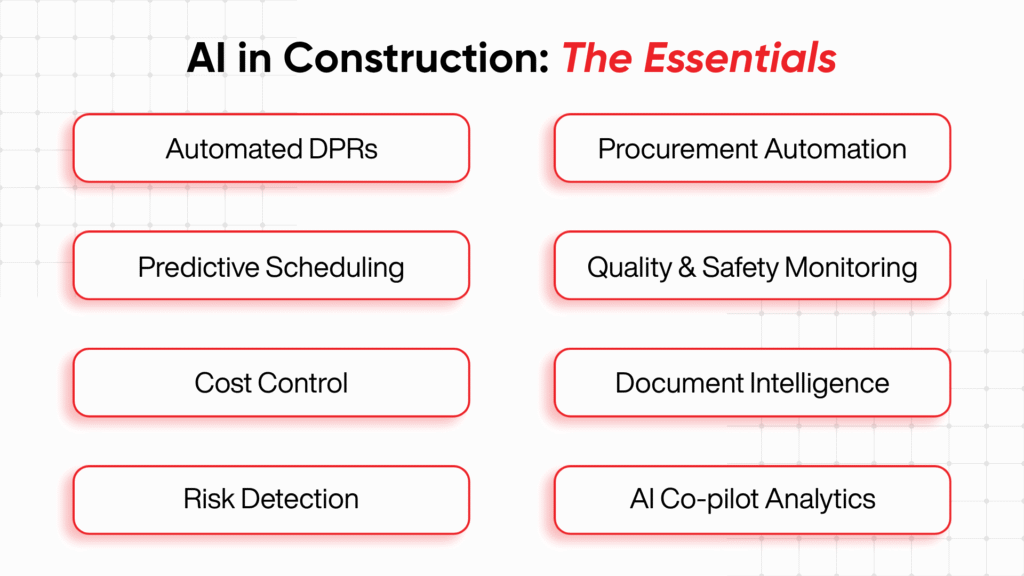
AI in construction management software is used across eight main areas: progress reporting, predictive scheduling, cost and margin analysis, risk detection, procurement automation, quality and safety monitoring, document intelligence, and conversational analytics. Each one replaces hours of manual work with outputs that update in real time.
Here is what each looks like in practice.
1. Automated Progress Reporting (DPRs)
Daily progress reports are the heartbeat of any site, and they’re also the task everyone hates. AI streamlines this by structuring photos, voice notes, and field entries into formatted reports automatically, then comparing reported progress against the schedule. Instead of a site engineer spending an hour each evening compiling a DPR, the system assembles it and highlights what’s behind plan.
In RDash, the DPR and progress reporting module automates 360° daily reporting in real time, so leadership sees ground reality without waiting for the next weekly call.
2. Predictive Scheduling and Delay Forecasting
This is where AI earns its keep. By learning from historical project data, weather records, resource availability, and live progress, AI scheduling tools forecast which activities are likely to slip before they actually do. The RICS 2025 AI in Construction report, which surveyed more than 2,200 professionals globally, found that progress monitoring and project scheduling were tied as the top two functions where practitioners expect AI to have high impact, each cited by 36% of respondents.
The practical payoff is significant. Predictive scheduling lets a project manager reallocate a crew on Tuesday instead of discovering the bottleneck at Friday’s review.
3. Cost Control and Margin Analysis
Construction margins are thin and leak quietly. AI continuously compares budgeted versus actual costs across BOQs, change orders, vendor rates, and site expenses, then flags variances the moment they appear. Rather than discovering a 4% overrun at month-end, teams catch it while there’s still time to correct course.
This is precisely the problem RDash’s AI Co-pilot was built to attack: detecting margin leakages and time lags from project data in seconds.
4. Early Risk Detection
AI is good at noticing patterns humans skim past. A recurring supplier delay buried in weekly reports, a dip in productivity across three unrelated tasks, a payment cycle quietly stretching, these are the early warning signs that compound into overruns. AI risk models scan live project data and raise a flag while the issue is still small.
5. Procurement and Vendor Automation
From auto-generating purchase orders against approved rate contracts to applying country-specific tax rules, AI removes the manual drudgery from procurement. It can match vendor invoices to orders, catch quantity mismatches, and route approvals to the right person automatically.
6. Quality and Safety Monitoring
Computer vision is the headline AI use case for safety, analysing site footage to detect missing PPE, unsafe proximity to equipment, or quality defects. While vision-based safety systems are more common on large infrastructure sites, the underlying idea (structured snag tracking tied to accountability) applies to every project. RDash’s snag management lets teams tag quality issues directly to the supplier order responsible.
7. Document and Contract Intelligence
A 200-page contract or a stack of design revisions is exactly the kind of dense, unstructured text where AI shines. Large language models summarise obligations, surface penalty clauses, and answer questions about scope in plain language. The RICS survey ranked reviewing contracts and project documents among the top functions for AI impact, cited by 30% of respondents.
8. Conversational Analytics (the AI Co-pilot model)
The newest and most accessible application: ask your project a question in plain English and get an answer. “Which projects are over budget this quarter?” or “Show me vendor payments pending approval.” This removes the dashboard-hunting and the dependence on an analyst to build a report. It’s the layer that finally makes the other seven applications usable by people who aren’t data specialists.
A Quick Comparison: Traditional vs AI-Powered Construction Software
|
Capability |
Traditional Software |
AI-Powered Construction Software |
|
Progress reporting |
Manual entry, compiled nightly |
Auto-structured from field data, real-time |
|
Scheduling |
Static Gantt charts |
Predictive delay forecasting |
|
Cost tracking |
Month-end reconciliation |
Continuous variance and margin alerts |
|
Risk management |
Reactive, after the fact |
Proactive, pattern-based early flags |
|
Analytics |
Pre-built dashboards only |
Plain-language, prompt-based queries |
|
Data context |
Siloed by team |
Unified semantic layer across teams |
The difference isn’t a faster spreadsheet. It’s the shift from looking backwards at what already happened to looking forward at what’s about to.
How RDash Uses AI in Construction Management
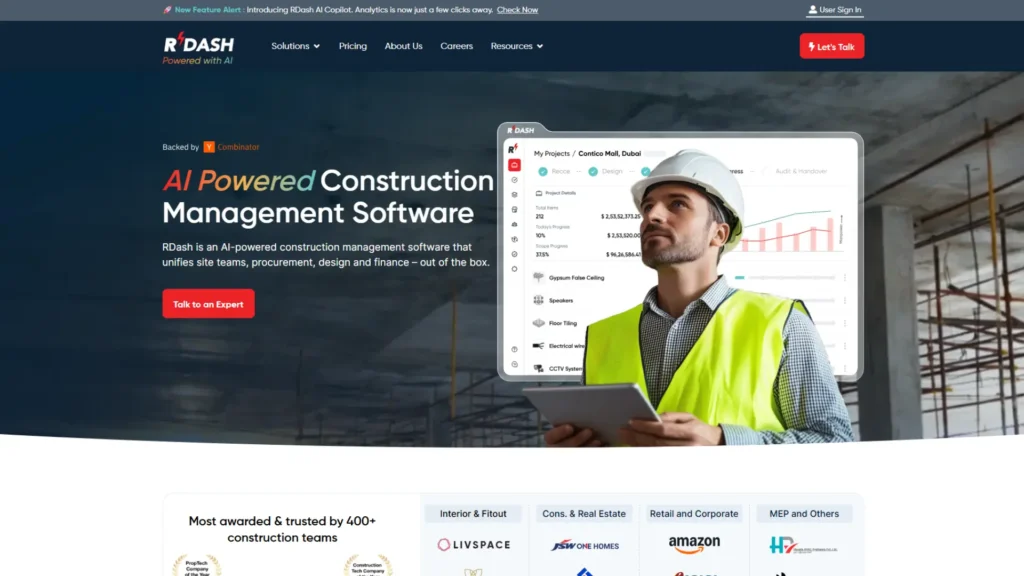
Most of this guide is deliberately vendor-neutral, because the principles hold regardless of which tool you choose. But it helps to see those principles in a real platform.
RDash is an AI-powered construction management software built specifically for the construction and fit-out industry, designed to unify site teams, procurement, design, and finance in one system, and to replace the WhatsApp-plus-Excel-plus-Drive stack that most teams are stuck with. It’s used by 400+ construction teams across India and the UAE, spanning interiors and fit-out, real estate, MEP, industrial, and corporate projects, and it’s backed by Y Combinator.
Why it suits a small construction business
These are the capabilities that map directly to how a smaller firm runs:
- It’s purpose-built, not generic. Pre-sales/CRM, activity schedules with dependencies, design version control, BOQ and change orders, automated 360° DPRs, site surveys, and snag management all live in one connected workflow covering a project from lead to handover.
- Procurement and finance are in the same system. Rate contracts, purchase requests, vendor POs and invoices, material GRN and issuance, site expense capture from a mobile app, and installed-progress tracking keep cost and cash flow tight and on-ground.
- The mobile app is built for the site. Available on Android and iOS, so supervisors capture progress, expenses, and surveys directly from the floor rather than reporting to head office after hours.
- AI does the watching for you. The RDash AI Co-pilot offers prompt-based analytics that flag margin leakages and time lags early, remembers project context, and renders insights as tables and graphs, useful precisely when you don’t have a dedicated MIS team.
- It connects to what you already run. Out-of-the-box integrations with Tally, Zoho, Odoo, MS Business Central, and SAP keep accounts and ERP aligned.
- Pricing and rollout suit smaller teams. RDash offers three plans: Lite, Pro, and Enterprise with an unlimited-user model, so every stakeholder can be on the platform without per-seat penalties. (Plan-wise pricing is published on the RDash pricing page.) On implementation, most teams go live within days, supported by structured onboarding and a 90-day deployment guarantee with dedicated account management.
Proof from the field
The proof shows up in how teams actually use it. Semac Construction, a Gurugram EPC firm running several large projects at once, used RDash’s approval hierarchy to tame hundreds of vendor POs that had been scattered across emails and folders, reporting 15% better project visibility, 10% faster approvals, and a 4% cost saving. A coworking operator with 35 properties across 14 cities built a real-time control tower and cut construction costs by around 12%. A residential interiors firm, Spacify Interiors in Tamil Nadu, brought constantly changing client scope under control and trimmed margin bleed by 15%. Different segments, same underlying win: control and visibility replacing scattered files and chat threads.
Being honest about fit
To be clear-eyed about fit: RDash is a serious construction platform rather than a bare-bones ₹500-a-month utility, and it shines for firms that run real BOQs, real vendor flows, and multiple sites. If that’s your business and for most growing Indian builders, contractors, and developers, it’s built for exactly your operating reality.
What Rollout Actually Looks Like
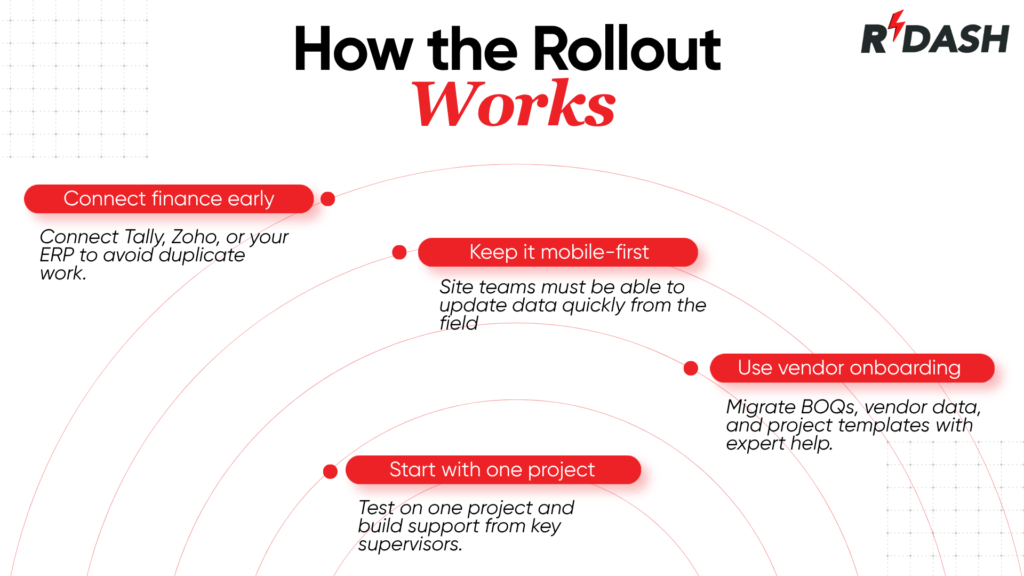
RDash is an AI-powered construction management software that unifies site teams, procurement, design, and finance in one workspace, with AI built into the core rather than bolted on. The platform’s intelligence layer analyses project activity, flags risks, and highlights what needs attention so teams make faster decisions without adding tools or complexity.
The clearest expression of this is the RDash AI Co-pilot, the feature that turns the platform’s data into answers.
What the RDash AI Co-pilot Actually Does
Based on RDash’s AI and Power Features, the Co-pilot:
- Delivers prompt-based analytics: ask a question, and it surfaces margin leakages and time lags in seconds, rather than making you build a report.
- Understands your context and remembers it; it stores chat history and gets sharper with every prompt, so follow-up questions don’t start from zero.
- Renders real outputs: it returns answers as data tables and graphs, and you can export results to Excel or subscribe to a graph for ongoing tracking.
- Operates on a wider semantic layer: a retrieval-augmented (RAG) setup lets it reason across broader project context, not just a single dataset.
- Guides you on best practices: it understands RDash’s own capabilities and points you toward the right way to handle your use case.
RDash has also signalled that proactive risk detection is on the roadmap; the Co-pilot is being developed to follow up on delays automatically and flag financial risks before money is lost.
The Rest of the AI and Power Stack
The Co-pilot sits on top of a connected system that makes its answers meaningful:
- Task Manager turns any context a photo, an order line, an expense request, a snag into a shared, trackable workspace, with auto-categorisation and WhatsApp/email reminders.
- Approval Hierarchy configures workflows by project type, role, and amount, with approvals linked directly to tasks.
- Element Libraries maintain a master catalogue for BOQs, orders, and rate contracts that vendors and clients can work from.
- Analytics ships with 50+ ready-to-plug dashboards plus custom reports and MIS.
- Integrations push and pull data with Tally, Zoho, Odoo, SAP, Microsoft Business Central, Oracle, and other ERPs.
RDash, which is backed by Y Combinator and used by more than 400 construction teams, reports outcomes including roughly 10% cost reduction and a 20% cash flow unlock by linking receivables and payables to installed work progress.

Expert Insight: Where AI Helps and Where It Doesn’t (Yet)
Having watched construction teams adopt these tools, a few honest observations are worth more than the hype.
AI is only as good as your data discipline. A Co-pilot querying a clean, unified project database gives gold. The same model querying half-filled spreadsheets gives confident nonsense. This is exactly why platforms that own the full workflow, form design to procurement to finance produce, better AI outputs than a chatbot stapled onto a fragmented stack. The semantic layer matters more than the model.
Adoption is the real bottleneck, not capability. The technology is ahead of the industry. RICS found that 45% of surveyed firms describe themselves as having limited capability and only exploring how to implement AI. Meanwhile, investor appetite is racing ahead. Construction Dive reported that the Zacua Ventures Contech Investor Survey 2025 found 56% of investors planning to increase AI funding year over year. That gap between investment and on-ground adoption is the story of construction AI right now.
AI augments judgment; it doesn’t replace it. The best framing is a co-pilot, not an autopilot. The system flags the margin leak; the project manager decides whether it’s a data error, a genuine overrun, or an acceptable variance. Treating AI output as a starting point for human decisions rather than a verdict is what separates teams that benefit from teams that get burned.
Practical Example: A Mid-Sized Fit-Out Firm
Picture a fit-out contractor running eight commercial interior projects at once. Before AI, the operations head spent Monday mornings stitching together site WhatsApp updates, chasing finance for the cash position, and discovering budget slippage only when an invoice exceeded the PO.
On an AI-powered platform, the same person opens the Co-pilot and types: “Which projects had cost variance above 5% last month, and which vendors are linked to it?” In seconds, a table appears: three projects, two recurring vendors, one clear pattern of under-quoted change orders. The progress reports already auto-compiled overnight. The pending approvals already routed to the right managers. Monday morning becomes a 20-minute decision meeting instead of a three-hour data hunt.
That’s the realistic, unglamorous value of AI in construction software. Not robots laying bricks just the right number in front of the right person at the right time.
Conclusion
The question is no longer whether AI belongs in construction management software; it’s how directly it touches the work that decides whether your project makes money. The most useful AI isn’t the flashiest; it’s the kind that quietly compiles tonight’s report, notices the margin slipping on Tuesday, and answers a plain question without a meeting. Construction has spent decades sitting on data it couldn’t use. The platforms that win the next few years will be the ones that finally turn that data into decisions.
RDash approaches this by building AI into a single connected workspace, with the AI Co-pilot acting as the layer that makes the whole system answerable. If your team is still hunting through spreadsheets to find out where a project stands, that’s the gap worth closing first.
Explore how it works on the RDash AI and Power Features page, or read more field perspectives on the RDash blog.
Frequently Asked Questions
1. How is AI being used in construction management software?
AI is used to automate daily progress reports, predict schedule delays, monitor cost and margin variance in real time, detect project risks early, automate procurement and approvals, review contracts and documents, and answer plain-language questions through conversational analytics co-pilots.
2. What is an AI co-pilot in construction software?
An AI co-pilot is an assistant built into the platform that answers project questions in plain English, returns data as tables and graphs, remembers conversation context, and flags issues like margin leakages or delays. RDash’s AI Co-pilot does this using a retrieval-based semantic layer over your project data.
3. Does AI replace project managers in construction?
No. AI augments project managers by handling repetitive analysis and surfacing risks, but humans make the decisions. The reliable model is a co-pilot that assists judgment, not an autopilot that replaces it.
4. Is AI in construction software accurate?
AI output is only as reliable as the underlying data. On a unified platform with clean, connected project data, results are highly useful. On fragmented spreadsheets, accuracy drops sharply, which is why integrated systems outperform bolt-on AI tools.
5. What are the main benefits of AI in construction management?
Faster and more accurate progress reporting, early delay and cost-overrun detection, tighter margin control, automated procurement and approvals, and self-service analytics that don’t require a data analyst.
6. How does AI improve construction scheduling?
By learning from historical project data, resource availability, and live progress, AI forecasts which activities are likely to slip before they do, letting managers reallocate crews and resources proactively rather than reactively.
7. Can AI help reduce construction costs?
Yes. McKinsey research links digital transformation to 4–6% cost reductions, and AI accelerates this by catching budget variances and margin leakages in real time instead of at month-end.
8. What construction tasks can AI automate?
Daily progress reports, purchase order creation, invoice-to-order matching, approval routing, document summarisation, task categorisation, and risk flagging are all commonly automated by AI in modern platforms.
9. Is the construction industry actually adopting AI?
Adoption is growing but uneven. RICS found 45% of firms are still only exploring AI, while 56% of contech investors plan to increase AI funding a clear gap between capability and on-ground use.
10. How is RDash different from generic AI tools?
RDash is purpose-built for construction and fit-out projects, unifying site, procurement, design, and finance data in one workspace. Its AI Co-pilot operates on that connected context rather than answering questions in isolation, which makes its insights far more actionable than a general-purpose chatbot.
11. Does RDash’s AI work with my existing ERP?
Yes. RDash integrates with Tally, Zoho, Odoo, SAP, Microsoft Business Central, Oracle, and other ERP and accounting systems, so AI insights draw on data already flowing through your financial stack.
12. How quickly can a team start using AI features like the RDash Co-pilot?
Most teams go live within days through structured onboarding, with a 90-day deployment guarantee on enterprise rollouts. Once your project data is in the platform, the AI Co-pilot is usable immediately through simple prompts.